Planning search has always asked you to think like a database. Pick the right council, find the postcode, choose a category, set a date range, tick the boxes. If you already knew exactly where to look, it worked. If you didn't, you were stuck.
So we built smart search. Type what you want in plain English on the homepage, and Plota works out what you mean. Refused change of use to flats in Bristol this year. Loft conversions on Mare Street, Hackney. Telecoms masts in Scotland in the last three months. No filters to find, no syntax to learn - just describe it.
How it works
Plota uses a large language model to read your query and translate the messy, free-form way people describe things into our structured planning data - councils, categories, dates, status, road names, keywords. The model handles the interpretation; everything after that is Plota's own search running against real applications.
You can see exactly how it was read
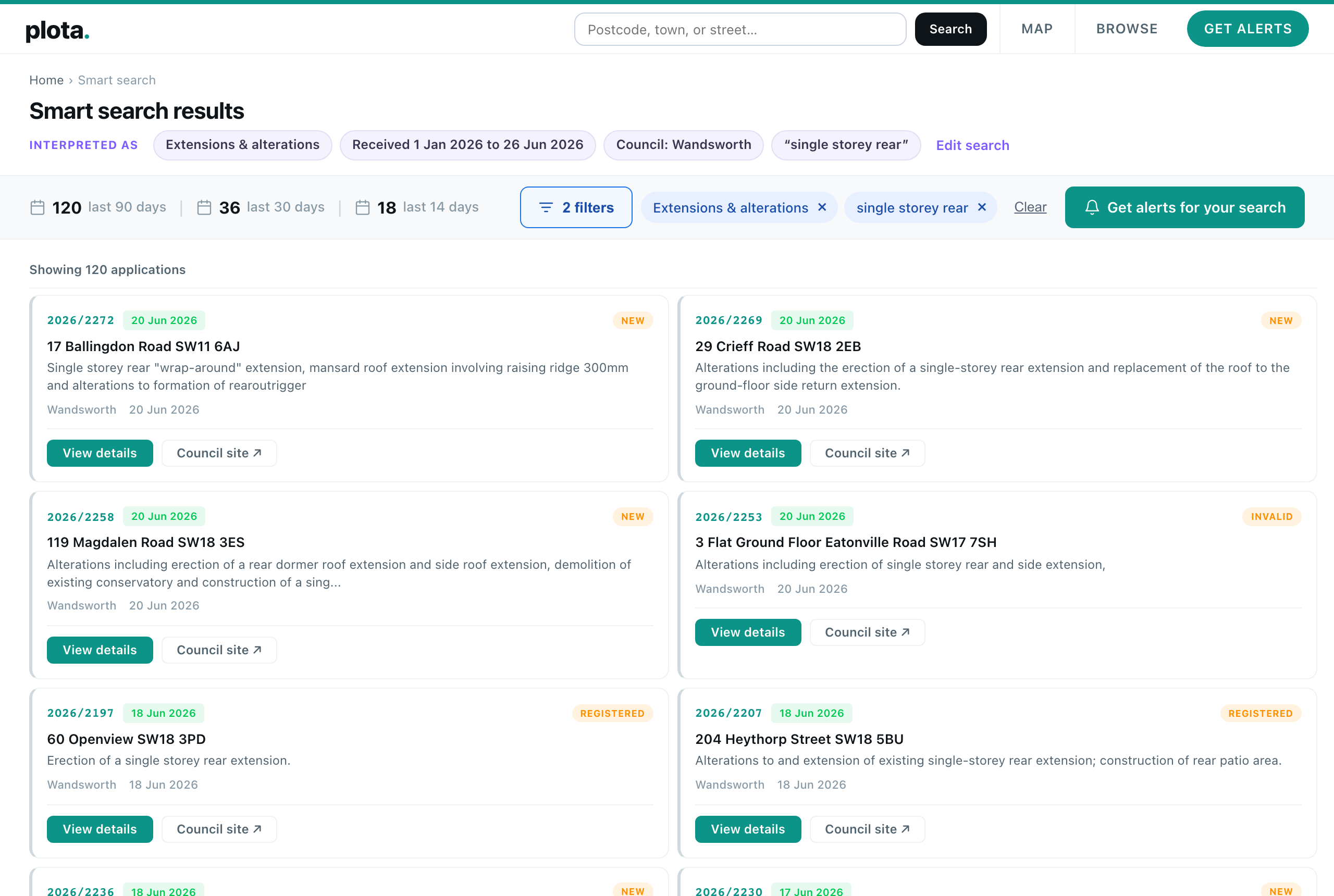
The thing we cared about most was trust. A search you can't see inside is a search you can't fix. So every query is broken down into chips - one per thing we understood - shown right at the top of your results. Council, category, dates, keywords, status, road. If we got something wrong, or you want to widen or narrow it, every chip is editable and removable. Nothing happens behind your back.
What you can search for
Smart search understands the things people actually type:
- Places - a postcode, town, city, county, region, or nation. Solar farms in Essex. New homes in the South West.
- Councils - by name, including counties that map to several authorities. Barn conversions in Devon.
- Roads - say on a road and we match applications on that street; say around or near and we search a radius instead. Extensions on Lavender Hill.
- Types of work - the same categories used everywhere on Plota: extensions, new homes, change of use, listed buildings, trees, solar, telecoms masts, demolition, signs, and more.
- Specific features - things a category doesn't capture become keywords matched against the address and description. Basement. Dormer. Swimming pool. HMO. Drive-thru.
- Dates - this year, last 3 months, since March, in 2025.
- Status - approved, refused, or pending.
- Reference numbers - paste one in and we jump straight to it.
And you can combine all of it in a single sentence. Approved single storey rear extensions in Wandsworth this year sets a status, a category, a keyword, a council, and a date range at once.
The rest of Plota, unchanged
Underneath, smart search lands you on the same results pages you already know - the same map, the same list, the same filter chips you can keep adjusting by hand. And the same Get alerts button, so any search you like can become a daily, weekly, or fortnightly email.
It's live on the homepage now, and on its own page at plota.co.uk/smart-search - and it's something we'll keep developing over time. If a search ever reads wrong, the chips show you exactly how it was understood, and you can fix it in a click.