Planning application alerts by email
Create alerts from a postcode, street, town, council, category, or drawn map area. Plota checks council portals daily, classifies applications by type, and keeps every saved area in one dashboard.
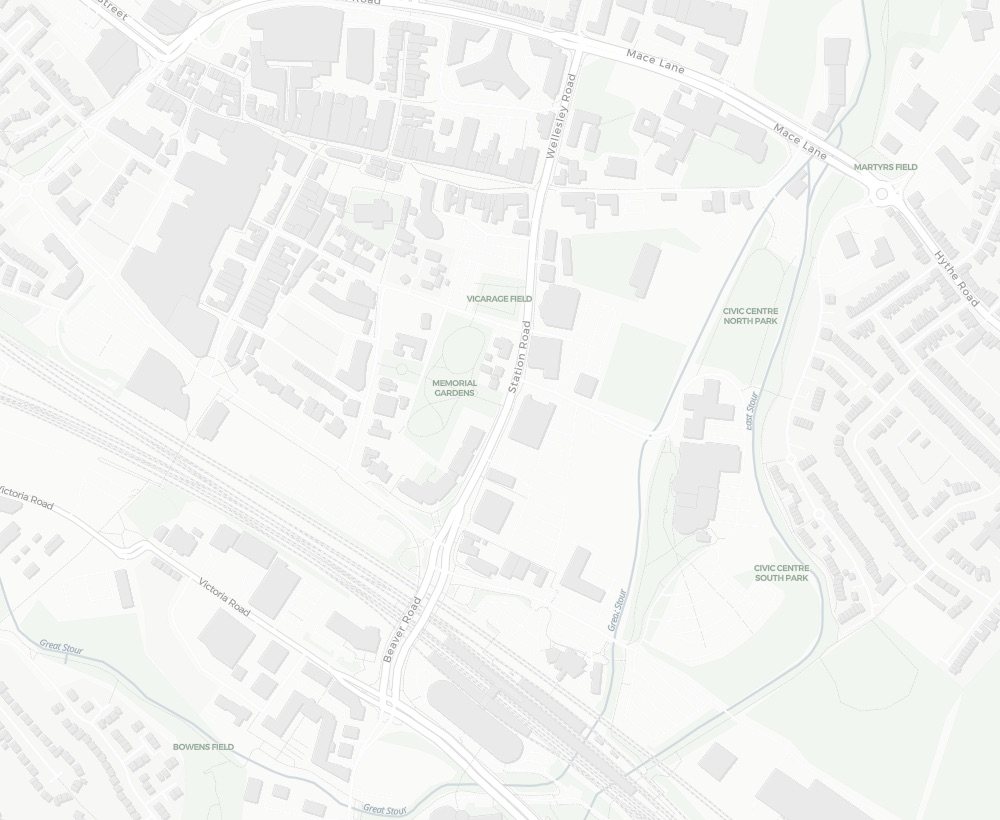
 3 new planning applications in Ashford, Kent
8:00 AM
3 new planning applications in Ashford, Kent
8:00 AM
Planning alerts that go beyond a postcode radius
A postcode radius is useful, but planning is rarely circular. You might want one side of a road, a conservation area, a village boundary, the land around a property you are buying, or several separate patches at once. Plota starts with search, then lets you save the places and application types you want to keep watching.
A better way to monitor planning activity
Planning data is spread across separate council portals, and most alert options are limited, inconsistent, or focused on applications you already know about. Plota gives you a more flexible way to discover new applications, save the areas that matter, and keep monitoring them over time.
Without PlotaManual council checks
Manual council checks
- Search separate council portals one by one
- Sign up where alerts are available
- Work around different portals, forms, and terminology
- Track known applications more easily than new activity
- Repeat the same checks for every place or client area
Without PlotaBasic alert tools
Basic alert tools
- Usually start with a postcode or radius
- Often send broad, noisy location matches
- Limited control over application categories
- Little support for exact boundaries or multiple areas
- Less useful when monitoring becomes a regular workflow
- Search across hundreds of UK council planning portals
- Save alerts from places, councils, categories, map searches, or drawn areas
- Filter by classified application type
- Manage saved areas, frequencies, filters, and exports in one dashboard
- Open the official council record whenever you need the source
Save the exact place you want to monitor
Start with a normal planning search, then turn it into an alert. Use a place, a council, the current map view, or a custom area drawn around the streets and boundaries that actually matter.
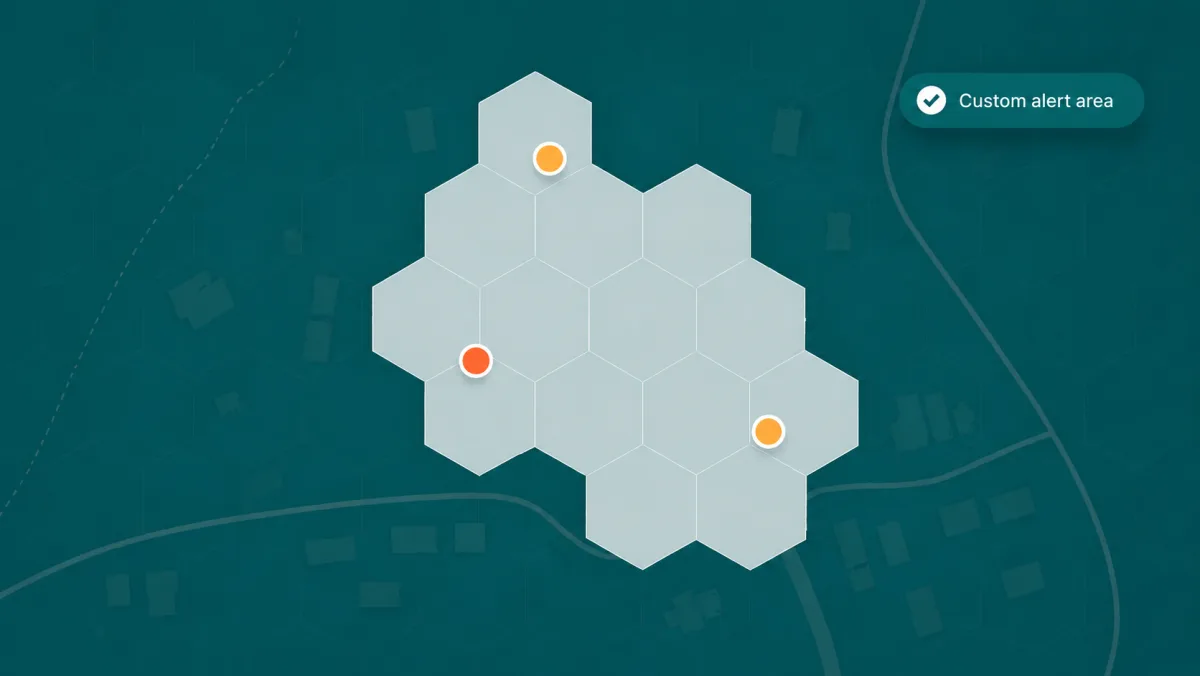
Draw an alert area that fits the real world
A fixed radius can pull in the wrong streets and miss the places you actually care about. Plota lets you define the area first, then watch the matching applications over time.
Filter planning applications by type
A single council feed can mix house extensions, new homes, tree works, telecoms masts, listed building consents, shopfront changes, signs, solar panels, and administrative updates. Plota classifies applications so your alerts can follow the planning activity you actually care about, not every item a council publishes.
 New homes
 Extensions & alterations
 Change of use
 Commercial & major works
 Trees & landscaping
 Listed buildings
 Schools, care & community
 Signs & adverts
 Solar & renewables
 Telecoms masts
 Demolition
 Agricultural
 Utility infrastructure
 Shopfronts
A few ways to combine area and category filters
Mix location, area, and application type to build the kind of planning alert you need. Start broad with a place or council, then narrow it down with drawn areas, categories, and saved searches.
Draw around a property, village edge, or patch of land, then watch only residential proposals inside it.
Keep an eye on householder applications close to your street without receiving every council update.
Monitor listed building consents and changes in a town centre, conservation area, or heritage setting.
Follow applications for masts, utility works, and infrastructure changes across a council or local area.
Track renewable energy proposals across rural areas, villages, industrial land, or whole councils.
Watch tree applications where context matters, such as conservation areas, gardens, and local campaigns.
Hundreds of council formats, cleaned into one
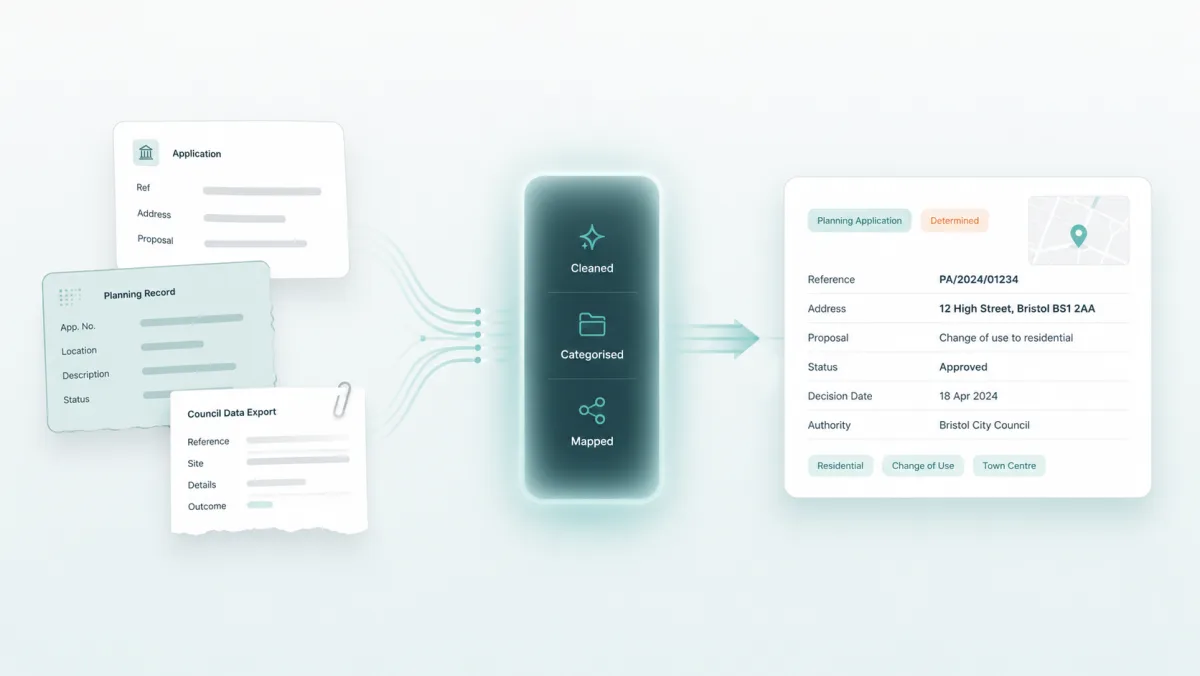
Council planning data is not standardised. Different authorities use different portals, descriptions, formats, abbreviations, references, and status labels. Some applications cover more than one thing at once, such as demolition followed by new homes, or a change of use with an extension.
Plota is a UK planning application search engine. New applications are collected from council planning portals, cleaned, categorised, mapped, and made searchable. The council portal remains the official source, but Plota helps you discover and track applications without searching dozens of local authority websites.
Manage every alert from one place
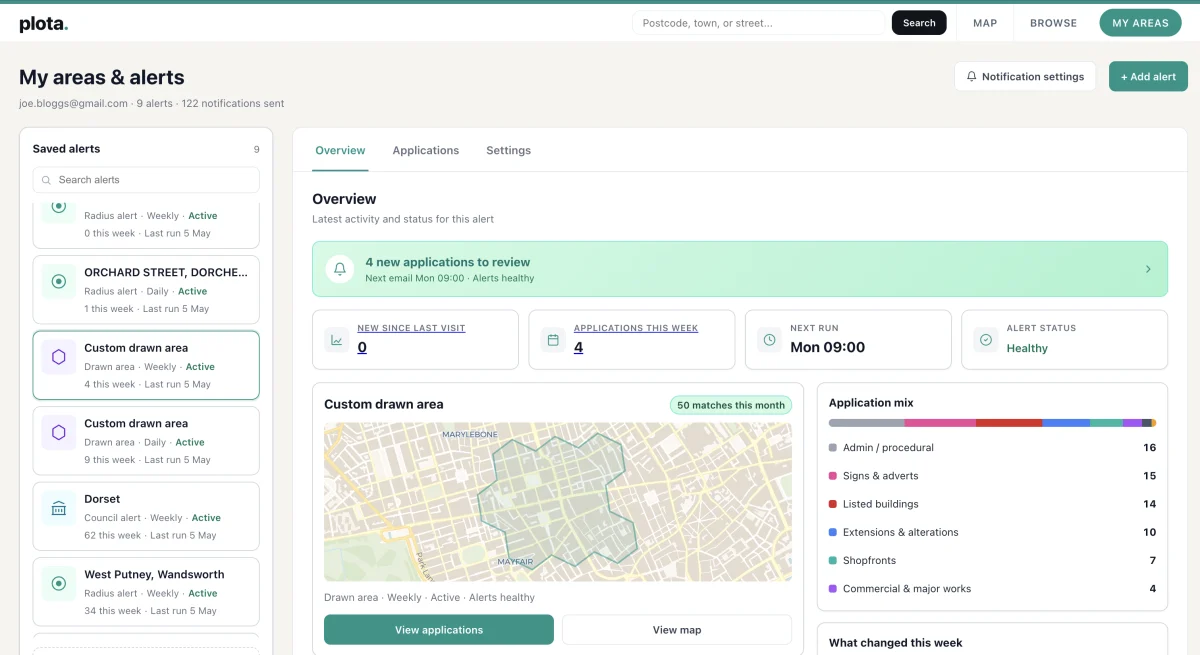
Your alerts are saved searches you can return to. Each one can be managed from your My Areas dashboard, which makes Plota useful for quick local alerts and more regular monitoring work.
- See what has changed since your last visit
- Browse applications that match each alert
- View matched applications on a map
- Filter by application category
- Sort and search application results
- Change alert frequency
- Pause or edit an alert area
- Duplicate an alert
- Export filtered results as CSV
- Manage multiple areas from one place
Daily, weekly, or fortnightly email digests
Know about new applications quickly.
Keep an eye on local change without too much email.
For lower-priority areas you still want to monitor.
- New applications in your area
- Application reference
- Address
- Description
- Status
- Council
- Application type
- Link to view on Plota
- Link to the official council record
Built for local awareness and professional monitoring
Plota is useful for anyone keeping an eye on local planning activity, but its classification, custom areas, and dashboard tools make it especially valuable for professionals who need to monitor places, councils, categories, and client areas repeatedly.
Planning consultants and agents
Monitor client areas, development sites, councils, and categories of interest. Use saved areas, map views, filters, and CSV exports to keep regular planning checks organised.
Architects and design teams
Track nearby applications, local precedents, householder activity, listed building consents, and the kinds of proposals being submitted in areas where you work.
Property and land teams
Keep watch on new homes, change of use, commercial schemes, infrastructure, and renewables around sites, search areas, or whole councils.
Community groups and campaigns
Follow a real boundary rather than a blunt radius. Draw the area your group cares about, filter by relevant application types, and share new activity with others.
Homebuyers and homeowners
See what might change near a property, street, or neighbourhood, from extensions and tree works to larger development proposals.
Researchers and local watchers
Use Plota to understand planning activity over time, compare places, follow categories, and avoid manually checking separate council portals.
Search first, then keep watching
The area should fit the real world
Start from a real search, then save the area that matters, whether that is a postcode, council, category, or drawn boundary.
The application type matters
Not every user wants every application. Focus on new homes, extensions, listed buildings, masts, tree works, solar, or commercial schemes.
Alerts should be manageable
A useful alert should not disappear into your inbox. Review, filter, edit, pause, and duplicate the searches and areas you follow.
Frequently asked questions
What are planning application alerts?
Planning application alerts are email updates that notify you when new planning applications appear in an area you care about. They help you monitor places, councils, categories, and custom areas without repeatedly checking separate council websites.
How do Plota planning alerts work?
Choose the area you want to monitor, then pick how often you want to receive updates. You can create alerts from a postcode, street, town, council, category, map search, or custom drawn area. Plota checks council planning portals daily and emails you when new matching applications appear.
Can I get alerts for a postcode, council, or drawn area?
Yes. You can start with a postcode, street, town, or council, or draw a custom area on the map using selectable hexagons. This means you can monitor the exact streets, neighbourhoods, villages, or boundaries that matter to you, rather than relying only on a simple radius.
Can I filter alerts by application type?
Yes. Plota classifies planning applications by type, so you can focus on the categories you care about. For example, you can monitor new homes, extensions, change of use, commercial and major works, trees, listed buildings, solar and renewables, telecoms masts, utilities, and more.
How often are alerts sent?
You can choose daily, weekly, or fortnightly email digests. Daily alerts are useful for areas you want to watch closely, while weekly or fortnightly alerts can work better for lower-priority areas.
How do I know Plota's planning data is accurate?
We are confident in the quality of Plota's planning data. New applications are collected from council planning portals, cleaned, mapped, and classified so they are easier to search and monitor. Each application links back to the official council record where available, so you can open the source whenever you need the full details, documents, comments, or deadlines.
Can I test Plota with an area I know?
Yes. Search a postcode, street, council, or neighbourhood you know well, then create a free alert for that area. You can browse recent applications, see how Plota classifies them, and open the official council record from each result where available. It is a simple way to get a feel for how Plota works before setting up more alerts.
Could I miss a planning application?
Plota checks council planning portals daily and is built to help you spot new planning applications without manually searching separate council websites. Coverage is broad and we are confident in the data, but planning information ultimately depends on what each council publishes and when it makes that information available. For formal decisions, deadlines, comments, or legal matters, always use the council portal as the source of truth.
Why does an alert sometimes arrive after the application's received or validated date?
Planning application dates do not always reflect when an application first becomes visible online. A council may publish an application days or weeks after the received date, and the validated date can also appear after the council has completed its internal checks. Plota checks council portals daily, so once an application is published and available through the council source, it should usually appear on Plota within 24 hours.
How quickly do new applications appear on Plota?
Plota checks council planning portals daily. Once a council publishes a new application and makes it available through its planning portal, it should usually appear on Plota within 24 hours. The exact timing can vary because councils publish applications in different ways and at different stages of the planning process.
Why does Plota link back to the council website?
The council planning portal is the official source for the application. Plota helps you discover, search, filter, map, and monitor planning applications more easily, then links back to the council record so you can view the full details, documents, comments, and deadlines where available.
Is there an API for planning application alerts?
Yes. Developers can access the same classified, source-linked planning data through the Plota planning applications API - search applications, turn saved alerts into API feeds, and send new matches to a CRM, spreadsheet, or AI workflow via webhooks.
Is Plota the official planning record?
No. The official planning record remains with the relevant local planning authority. Plota helps you discover, search, filter, map, and monitor planning applications more easily, with links back to the council record where available. For formal decisions, deadlines, documents, and comments, always use the council portal as the source of truth.
Why might Plota's category differ from the council description?
Council descriptions vary widely and often cover more than one kind of work. Plota classifies applications to make them easier to search, filter, and alert on. Categories are designed to be useful for discovery and monitoring, but they should be treated as a practical guide rather than a legal planning classification. Always check the full council record if the exact detail matters.
Which councils does Plota cover?
Plota covers 389 UK planning authorities and checks council planning portals for new applications daily. You can see the full list on the councils page. Coverage can vary where councils change systems, use unusual portals, or publish limited data. Where an application is shown, Plota links back to the official council record where available.
Why use Plota instead of council planning alerts?
Council alert services vary widely. Most councils do not offer flexible new-application alerts, and where alerts exist they are often tied to one portal, one search type, or applications you already know about. Plota gives you a more consistent way to discover new applications, create alerts from places, councils, categories, map searches, or drawn areas, and manage saved areas from one dashboard.
Why use Plota instead of a basic postcode alert?
A postcode alert can be useful, but planning activity does not always fit neatly inside a circle. Plota lets you monitor by postcode, street, town, council, category, map view, or custom drawn area. You can also filter by classified application type and manage multiple saved areas from one dashboard.
Start tracking new planning applications
Search for a place, council, category, or custom area, then save it as an alert. Plota will email you when new applications match the places and types you care about.
Create a free alertJoin thousands across the UK receiving Plota planning alerts.
Your email is used to send your alerts and nothing else. We never sell or share it, and you can unsubscribe in one click. Privacy policy
Need alerts for work? Pro alerts go further.
Paid plans include Pro alerts: keyword-level filters across every UK planning register, nationwide or by council, with commercial use included.